
Did you know the burglary rate in Houston, TX is 3.211 per 1,000 residents in a typical year?
The good thing is that, according to a study, about 60% of burglars consider the presence of cameras before selecting a target.
Installing security cameras can get too technical at times. But if you’re willing to learn the process, it’s completely doable, especially when the goal is to install a basic system.
The length and complexity of the process depend on the number of cameras and the type of surveillance system (Wired or wireless).
In most cases, when you know what you’re doing, you can install a CCTV security camera system within a few hours to half a day.
In this guide, we’ll talk you through the entire security camera installation process so you know exactly what to do.
Let’s dive in.
Plan Your Security Camera Setup
Before you pick up your tools, take a moment to plan your setup. This will make the entire process much easier to implement.
Choose Between Wired and Wireless Cameras
Start by deciding on the type of cameras you want to use. Do you want a wired or wireless system? Here’s a quick overview of both.
Wireless Cameras: These cameras connect to your Wi-Fi, making them ideal for renters or beginners who don’t want to drill holes in their walls.
Wireless cameras transmit the data to cloud storage via Wi-Fi. However, they run on batteries, which will require recharging or replacement after some time.
Wired Cameras: You’ll connect these cameras to a physical recording setup, such as a DVR, via a cable.
While this setup takes more planning and time, it’s great if you want a more permanent setup.
Wired setups tend to be more resistant to hackers as well. Plus, you don’t need to recharge or replace your batteries.
Pick the Right Locations for Each Camera

Think about the locations where trouble is most likely to happen. For instance:
- Front and back doors
- Garages and driveways
- Hallways
- Backyards
Pick a spot that’s at least 10 feet high to minimize the chances of tampering.
Gather Your Tools
You don’t get all the tools and equipment with a CCTV security setup. Make sure you have everything you need:
- Security cameras
- DVR or NVR
- Cables or a power adapter
- Screws and anchors (Usually includes with the camera setup0
- Drill and screwdriver
- HDMI or VGA cable
For a wireless camera system, make sure all camera locations have a strong Wi-Fi signal.
How to Install a CCTV Security Camera: Step-by-Step
Now that you have everything you need, it’s time for installation. Before proceeding, make sure all your cameras work.
Mount the Brackets and Install the Cameras
Most camera setups include a drill template unique to the camera to assist with screw placement.
Use it to drill pilot holes for the screws. Insert mounting pins by gently tapping them with a hammer.
Next, connect the camera to the bracket and make adjustments so that you don’t have any blind spots.
Wired Vs. Wireless CCTV Setups
Your next steps depend on the type of CCTV camera setup. For a wired setup, you’ll need to use cables to connect each camera to the DVR. Next, plug each camera into a power supply.
For wireless cameras, the process is way simpler. First, plug the camera into a power supply (If it’s not battery-powered).
Next, connect it to your Wi-Fi using the software or application provided.
Connect the Camera to the DVR and Power Supply
A wired camera setup involves cables that exit from a large hole at the center of the mount guide.
You’ll need to connect each camera with the DVR and a power supply. Fish tape can be handy when feeding cables into tight spaces.
To power the DVR, simply use an electrical outlet.
Important: Make sure the power is off during this process.
Connect Your DVR to a Screen

Next, to know what your security cameras are recording, use an HDMI or VGA cable to link your DVR to a screen.
The DVR stores all the information. Depending on the type of DVR, you can connect 4, 8, 16, or 32 cameras to a single DVR.
With a wireless system, you’ll be able to configure the display through the application or software.
Once you’re done, turn everything ON and make sure each camera feed is working.
Security Camera Installation Tips
Installing a security system is the first step towards mental peace and a safer home, office, or business location.
Here are some additional tips to help you get the most out of your system:
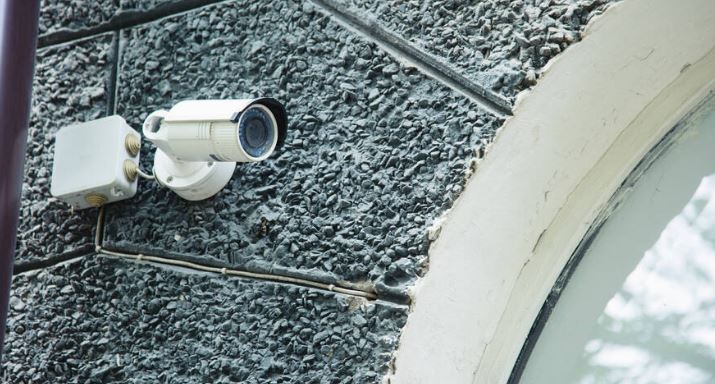
Use Junction Boxes: For outdoor setups, use a weather-proof junction box. It’ll protect your wires and connectors from rain and extreme temperatures.
Angle Cameras Away from Direct Light: Avoid pointing your camera towards bright light sources, such as:
- The Sun
- Porch light
- Headlights
Glare can make your footage unclear and even trigger false motion alerts. Position the camera so that the light sources are behind it.
Use Tamper-Resistant Screws: Tamper-resistant screws make it harder for anyone to remove your camera. Replace the standard screws with them for extra protection, especially if your camera is easily accessible.
Secure Your Network: If you’re using a Wi-Fi camera, change your default username and password on the router and the camera app.
Use strong passwords that are difficult to guess.
Security Camera Installation: A Quick Recap

Here’s a quick recap of the entire security camera installation process in Houston, TX:
- Choose the right location. Mount the camera high (At least 10 feet) to prevent tampering
- Install the mounting bracket with a drill and screws
- Attach the camera to the bracket and adjust its position
- Connect the camera to a power supply. If it’s a wired system, also connect it to the DVR
- Connect the DVR with a power source and a screen using an HDMI or VGA cable
Check our Google Business Profile and Customer Reviews Here.
We’re on Google Maps:
Wrapping Up
Having an effective surveillance system in Houston, TX, gives you the necessary peace of mind. Installing it yourself doesn’t have to be difficult either.
If you want to go the DIY route, this step-by-step guide should be enough to help you install a foolproof CCTV system.
However, we get it. Not everyone has the time or energy to deal with the hassle of drilling holes and ensuring smooth wiring.
If you’d rather leave it to the pros, our experts are here to help. Let us handle the tricky work for you.
All you have to do is call us at 281-973-5279 or fill out this form to get a free quote.